| 1) | Open the PageGate Admin. |
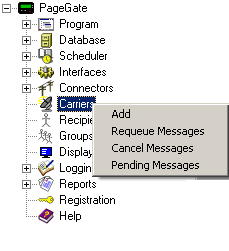
| 2) | Right click on Carriers |
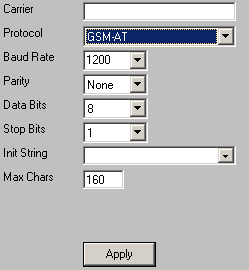
| 4) | Name the Carrier what it needs to be (GSM1, GSM2, etc). |
| 5) | Set the Protocol to GSM-AT. |
| 6) | Set the baud rate, parity, data bits, and stop bits to the GSM Device's specifications. |
NOTE: The industry standard for most GSM Devices is as follows:
Baud Rate: 115200
Parity: None
Data Bits: 8
Stop Bits: 1
| 7) | Click in the init string field, not on the drowndown, and type in: |
AT+CSQ
| 8) | Set the Max Chars to the maximum number of characters you wish to be sent in a transmission. |
| 9) | Click on Apply to add the carrier to your Carriers list. |
|
|


