PageGate's GetMail Interface allows you to receive SMTP/Email traffic and translate it into outbound messages in a different format. Simply enabling the GetMail interface is enough to allow PageGate to receive incoming SMTP connections. By default, the mail server listens on port 25 but you can customize this to other ports with or without TLS/STARTTLS enabled. We've even added OAUTH support to version 11's mail server!
If anything in your environment has the ability to send email, it can easily be integrated with PageGate by using PageGate's email interface. It is worth noting that this interface can be used to integrate applications running on different platforms (Unix, Mac, etc.).
|
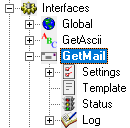
Clicking the + next to its' name in the menu tree will reveal a few options. This section controls the implementation of the GetMail API.
This section displays the running/not running status of the interface.
This section allows you to configure a custom template for messages processed by this API.
•Log This section contains a log of all activity recorded by the PageGate Mail Server and GetMail module. |
|
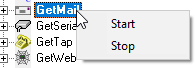
Right clicking on GetMail will provide a context menu with two options. •Start Selecting this option will start the GetMail module and PageGate Mail Server service, if stopped.
•Stop Selecting this option will stop the GetMail module and PageGate Mail Server service, if started. |
PageGate has a fully functional mail server engine as a core part of the program but without the GetMail module, you only ever access the outbound functions of this mail server. The GetMail module unlocks the receiving/inbound portion of the mail server engine.
This interface can be configured to receive email/SMTP messages in one of a few ways and it's important to note that these methods are NOT mutually exclusive. You could configure any or all of these methods to function simultaneously.
•PageGate functions as a relay server
One of the best methods of email integration is to have PageGate function as a relay server in its' own right. In this configuration, other things in your environment will be referencing the hostname or IP address of the PageGate server as its' mail server and you'll need to configure PageGate to recognize what traffic is meant to be passed on to your mail server as real email and what traffic is meant to be redirected out as SMS, API calls, etc.
•Sub-domain hosting
One of the better methods of email integration is to have PageGate host a sub-domain off of your existing domain. To do this, you'll want to talk to your mail server administrators and ask them to create this sub-domain for you, then redirect the MX record for that sub-domain to the internal IP address of the PageGate server. For example, let's say you have an email domain of example.com. So, you might have something.example.com or messaging.example.com or pg.example.com created and redirected to the internal IP of the PageGate server. At that point, PageGate 'owns' the sub-domain and processes all traffic intended for it.
So, let's say that we have a group called sales_team and we have GetMail configured to use messaging.example.com. You could send an email to sales_team@messaging.example.com and that email would be delivered to all members of the group as it exists in PageGate.
•POP Mailbox
POP is a relatively antiquated method of receiving email and many modern mail servers don't support it. However, if your mail server does still support POP mailboxes, you can configure GetMail to periodically check those email addresses, then read in any email waiting in the mailbox and deliver that traffic to a recipient or group of your specification.
If your POP server requires SSL/TLS authentication, be sure to set the Pop_Delivery_Port Template value to 995. For more information, please see the Parameters for GetMail section.