How PageGate Recieves Messages
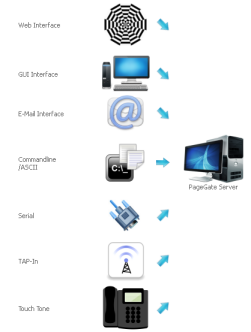
|
PageGate is a powerful SMS and text messaging gateway. PageGate accepts messages a variety of ways and can dispatch them via text messages using a variety of protocols and methods.
PageGate is a flexible powerful way to take control
of corporate communications. PageGate is modular and scaleable, it can be incredibly powerful serving the needs of a multi-location business or agency or simply handle day to day communications of a small office.
PageGate allows for network text messaging or network
wide SMS messaging through a combination of the
following methods: email, web, command line,
textfile, Internet, serial port, modem, mobile
phone, wireless modem, direct database access
or a windows client.
SMS or text messages can be sent to any number of cell phones, mobile phones,
wireless devices, pagers, billboards,
etc....
PageGate can be installed to run on a single
non-dedicated workstation, or using its modular
architecture, PageGate can actually be installed
across a dozen or more computers for a truly high-performance
messaging gateway system. |
| Benefits to PageGate |
 |
Increased Speed of Incident Resolution |
A reliable communication solution increases the speed of incident resolution. With increased response times, informed decisions can be made bring a critical incident to a timely resolution. |
|
Anywhere, Anyone, Any Time, |
Text messaging is everywhere. Text messaging can reach remote employees, regardless of their location, as long as the cell phone has a signal, text messages can be sent and recieved. |
|
Time Sensitive |
Text messages are received immediately. |
|
Effective and Direct |
Text messages are personal, direct and effective. Text messages reach the intended recipient and can concisely convey a message. |
|
Automatic and Efficienct |
Text messages can be automated should certain conditions exist, ultimately increasing efficiency |
|
Logging & Tracking |
Unlike a voice conversation, text messaging through PageGate retains a record of the conversation. PageGate's logging function retains the date and time stamps, so if the need should occur a timeline of communications can be reconstructed |
|
Scheduled |
With PageGate SMS or text messages can be scheduled to go out at a certain date and time. |
|
Bi-Directional Communication |
With PageGate you can communicate back and forth to personnel in the field using the Windows Client.
PageGate also can bi-directionally communicate with nearly any web based API. This allows for both sending information to and receiving information from many Internet and intranet sources. |
|
Save Time |
It takes far less time to send a text message than to make a phone call. |
|
Redundant |
If the cell phone is off or out of signal range, the message will arrive at the recipients phone if it is switched on or receives signal within 48 hours of sending.
Additional PageGate has redundant sending methods, if the method delivery fails, an alternative method delivery method can be selected. |
|
Support for Individuals or Groups |
Send individual messages or group messages. |
|
Secure Database Options |
PageGate can be deployed to a local, or a cloud server with an encrypted SQL connection. This gives users the ability to use the PageGate Client securely from anywhere! |
|
Universal & Ubiquitous |
Text messaging is a universal platform that is more prevalent than specific messaging applications. |
|
Time Management & Reminders |
PageGate can be setup to send reminders to broadcast messages to individuals or groups.
PageGate Admin now has the ability to schedule messages to go out in the future and can also schedule repeating messages, making it much easier to create routines to poll data from APIs
|
|
Convenience |
Let's face it text messaging is convenient. |
| |
Readability |
Statistics clearly indicate that text messages open rates at 98% far exceeds that of email. In fact most text messages are read within 15 minutes of receipt. |
|
Eco-Friendly |
Text messaging is eco-friendly and has the lowest impact for communication methods on your carbon footprint, |
|
Discrete |
Text messaging is more discreet than a phone conversation, making it an ideal form for communicating. |
|
Less Intrusive |
Text messages are less intrusive than a phone call. |
|
Flexible and Selective Filtering |
The optional Filter Pack has a number if added capabilities and improvements, allowing for even more flexibility and support for nearly any data format. This expands on PageGate's abily to accept, reformat, and send just about any textual data format. It is especially useful when interacting with internet and intranet APIs. |
|
Save Time and Money |
Everyone knows time is money, increase response times, reduce down time and save money |

















 PageGate v10


